

You wrote the post. It is sitting in a Notion doc, a Slack thread or a spreadsheet of "things to publish this week". Now someone has to open LinkedIn, log in, deal with the two factor code, paste the text and click Post. Every time.
LinkedIn does not hand out its posting API to just anyone. The web page, on the other hand, is right there. The LinkedIn blueprint uses it the same way you would, only faster and without forgetting.
What a run looks like
This is the flow in action. On the left, the five steps. On the right, the browser session it recorded: the composer is open and the text is going in.
Give it a message as input, press Run, and a minute later the post is live on your profile. Hook it to a schedule or a webhook and the "someone" in the first paragraph becomes nobody.
Five boxes, no code
The flow is built in the visual editor. Each box is one thing the browser does:
- Log in (a reusable snippet, more on that below).
- Open the LinkedIn feed.
- Wait a moment for the page to settle.
- Type the message.
- Click Post.
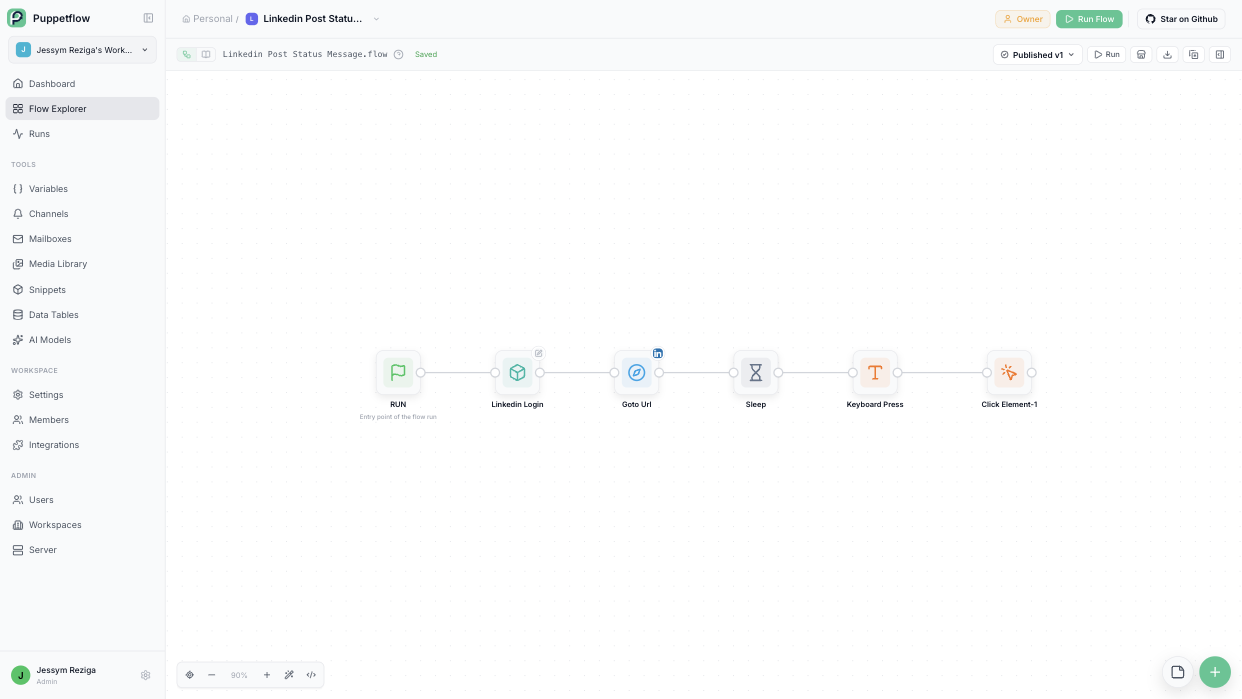
That is the whole thing. If LinkedIn moves a button, you fix one box.
Two factor login, handled
Most LinkedIn accounts have two factor authentication turned on, and that is usually where automation projects die. Not here.
The login snippet takes your email, your password and the secret behind your authenticator app. On each run it generates the six digit code itself, exactly like the app on your phone would, and types it in. No SMS to wait for, no human to wake up.
And because Puppetflow remembers the session, the next runs skip the login altogether until LinkedIn logs you out. The same snippet can be reused by any other LinkedIn flow you build later: reacting to posts, exporting connections, checking a company page.
Where this goes
A post from an input is the smallest useful version. From there people usually:
- Connect a spreadsheet or a data table of drafts and let a weekly schedule pick the next one.
- Trigger the flow from a webhook when an article is published on the blog.
- Send the result to Slack so the team knows it went out.
None of that requires touching the flow. Triggers and actions live around it.
Import the LinkedIn blueprint to try it on your own account, or read the nodal flows guide to see how boxes turn into automations.


