

Let's be honest: nobody needs a robot to play the lottery. But if you want to see what a browser automation looks like when it hits the messy parts of the real web, a Lotto grid is a surprisingly good playground. There is a login, a captcha, a page full of buttons to click in the right order, and a confirmation dialog that shows up only sometimes.
The FDJ blueprint handles all of it. Here is what happens when you press Run.
Watch it play
Puppetflow records every run. Below is the FDJ flow at the moment it picks its numbers: a real Chrome window, driven by the flow, filling the grid on the FDJ website.
The left side is the flow. The right side is the browser it controls. When something goes wrong at 3 am, this is the view you open. No log spelunking, just the video.
Built without code
This one is a nodal flow. Each box is one action: open a page, click a button, wait, repeat. You drag them onto a canvas and connect them. The FDJ flow reads like a to do list:
- Log in with the FDJ login snippet.
- Open the Lotto page.
- Pick five numbers between 1 and 49 and one lucky number.
- For each number, click its bubble.
- If a dialog pops up, close it and keep going.
- Stop before payment. This is a demo, not a spending habit.
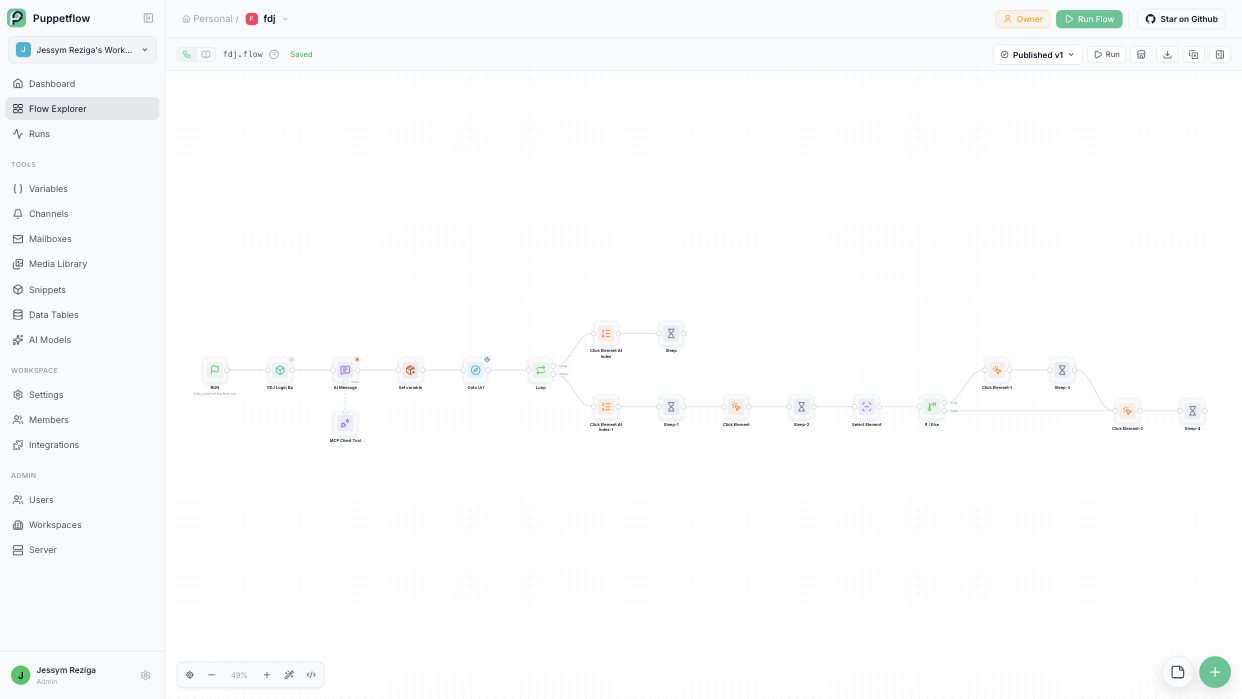
The loop and the condition are just nodes too. No for, no if, no semicolons. If you would rather write it as JavaScript, Puppetflow lets you do that as well, and the two styles can call each other.
The captcha problem, solved the honest way
FDJ shows a captcha at login. Puppetflow does not try to defeat it. Instead, the flow pauses and asks a human.
You get a notification with a link. You open the live browser view, solve the puzzle in a few seconds, and the flow picks up where it left off. We call this human validation, and it is the reason a lot of "impossible to automate" processes turn out to be very possible. Nine steps out of ten are boring and repetitive. Let the robot do those and keep a person for the tenth.
Once the session is saved, the following runs skip the login entirely, so you are only asked when the site logs you out.
Why we ship a lottery flow
Because it is fun, and because it is a compact tour of what matters in browser automation:
- A login that remembers you.
- Loops and conditions in a visual editor.
- A safe stop before anything irreversible.
- A human who steps in exactly when needed, and never otherwise.
Swap the Lotto grid for an expense form, a supplier portal or an internal admin tool and the recipe is the same.
Import the FDJ blueprint into your workspace, or read about human validation in the docs. And remember to play responsibly, or better, let the robot play for you.


